Skip to content
Nodomo for real estate & construction

From acquisition
to handover

A site moves through acquisition, fit-out and handover across real estate, legal, design and construction, with landlords, brokers and contractors outside your system. Nodomo runs it as one flow.

14 days free Vendors join by link. No login needed.

Site acquisition & due diligenceInteractive workflow
TRIGGER

Site shortlisted, LOI signed

Real estate shortlists the site and the landlord signs the LOI

TASK

Site shortlist and LOI intake

1dReal Estate
TASK

Environmental review (Phase I ESA)

10dLegal
TASK

Title and survey review

7dLegal
TASK

Lease and zoning review

7dLegal
TASK

Property condition review

5dProjects
TASK

Financial checks

7dFinance
APPROVAL

CFO diligence sign-off

5d1 levelCFO
TASK

Lease execution handoff

5dLegal
REWORK

Rework

Declined — loops back to the issue owner

Drag to explore · Use buttons to zoom · Click a step to focus
From the first site visit to the final handoverOne owner for every next step
From the Amply team. Trusted by multi-location brands.
Keep opening day in sight

Small delays.
Big opening-day impact.

An unsigned lease, a drawing waiting with the client, a subcontractor update lost in chat. Connect the handoffs between acquisition, fit-out and turnover.

Landlords go quiet

The LOI is with the landlord. Nobody knows if it was read.

Drawings sit with the client

The site waits. The subcontractor is billing standby. Nobody is chasing.

Subcontractors are invisible

Completion claims arrive on chat with no timestamp and no link to the task.

Real Estate & Construction use cases

One connected plan.
Every site.

Start from a template for the most common commercial real estate and real estate development projects, or build a flow for anything else: land acquisition, capex approvals, lease renewals.

Environmental, legal, title and lease reviews run in parallel, each with an owner and a deadline against the contract date.

Design and construction drawings route to the landlord and tenant for the sign-offs the lease requires, each with a deadline.

Documents, keys, warranties and training sessions each get an owner, so the FM team or broker inherits a complete record.

Vendors upload licences, insurance and quotes from one link, no login, and every document's expiry gets a reminder before it lapses.

Copy one fit-out flow across every site, and see each site's stage, bottleneck and days remaining on a single dashboard.

Site Acquisition & Due DiligenceRun live
TRIGGER

Site shortlisted, LOI signed

Real estate shortlists the site and the landlord signs the LOI

TASK

Site shortlist and LOI intake

1dReal Estate
TASK

Environmental review (Phase I ESA)

10dLegal
TASK

Title and survey review

7dLegal
TASK

Lease and zoning review

7dLegal
TASK

Property condition review

5dProjects
TASK

Financial checks

7dFinance
APPROVAL

CFO diligence sign-off

5d1 levelCFO
TASK

Lease execution handoff

5dLegal
REWORK

Rework

Declined — loops back to the issue owner

Drag · Zoom buttons · Click a step

Tenant Improvement (TI) Fit-OutRun live
TRIGGER

Lease executed

TI allowance and fit-out scope confirmed

TASK

Space plan and drawings prepared

10dDesign
APPROVAL

Landlord approves drawings

5d1 levelLandlord
TASK

Building permit filed

14dProjects
TASK

Utility connections requested

10dProjects
TASK

GC selected, contract executed

7dProcurement
TASK

Build-out executed on site

30dGC
TASK

Occupancy inspection completed

5dProjects
TASK

Punch list walkthrough

5dProjects
TASK

Fit-out complete, ready for handover

1dProjects
REWORK

Rework

Declined — loops back to Design

Drag · Zoom buttons · Click a step

Project Closeout & Asset TurnoverRun live
TRIGGER

Practical completion declared

Run this workflow manually with a button click

TASK

As-built drawings submitted

10dGC
TASK

Warranties and manuals collected

10dProjects
TASK

O&M manuals compiled

10dGC
TASK

Lien waivers and certificates collected

7dFinance
TASK

Final walkthrough, snag list logged

5dProjects
TASK

Snag items closed with photo proof

10dGC
TASK

Systems walkthrough (HVAC, FLS, electrical)

3dProjects
TASK

Keys and credentials transferred

2dProjects
APPROVAL

Handover docket signed

5d1 levelFM/Broker
TASK

Asset live, retention released

1dFinance
REWORK

Rework

Declined — loops back to the open item

Drag · Zoom buttons · Click a step

Subcontractor & Vendor OnboardingRun live
TRIGGER

New vendor requested

Procurement names the vendor and trade or scope

TASK

Vendor intake

1dProcurement
TASK

COI uploaded

5dVendor
TASK

Licence and certifications uploaded

5dVendor
TASK

Safety record submitted

5dVendor
TASK

Bank details and tax form submitted

3dVendor
TASK

COI renewal reminder scheduled

1dSystem
TASK

COI verified

3dCompliance
TASK

Licence and certifications verified

3dCompliance
TASK

Safety record verified

3dCompliance
APPROVAL

Compliance clearance

3d1 levelCompliance
REWORK

Rework

Document resubmission requested

TASK

Quote reviewed against budget

3dProcurement
APPROVAL

Commercials approved

3d1 levelFinance
TASK

Vendor cleared to start

1dProcurement

Drag · Zoom buttons · Click a step

Multi-Site RolloutRun live
TRIGGER

Rollout triggered

Sites and target window confirmed

TASK

Rollout list confirmed

1dReal Estate
TASK

Site drawings and scope confirmed

5dDesign
TASK

Contractor assigned per site

3dProcurement
TASK

Build-out executed per site

21dGC
TASK

Punch list closed per site

5dProjects
APPROVAL

Site sign-off

3d1 levelRegional Ops
TASK

Site handed over, complete

1dOps
REWORK

Rework

Declined — loops back to that site's punch list

Drag · Zoom buttons · Click a step

Built for real estate & construction

Every team.
The same next step.

Turn a scattered checklist into a connected workflow, from the first approval to the final handover.
From the field
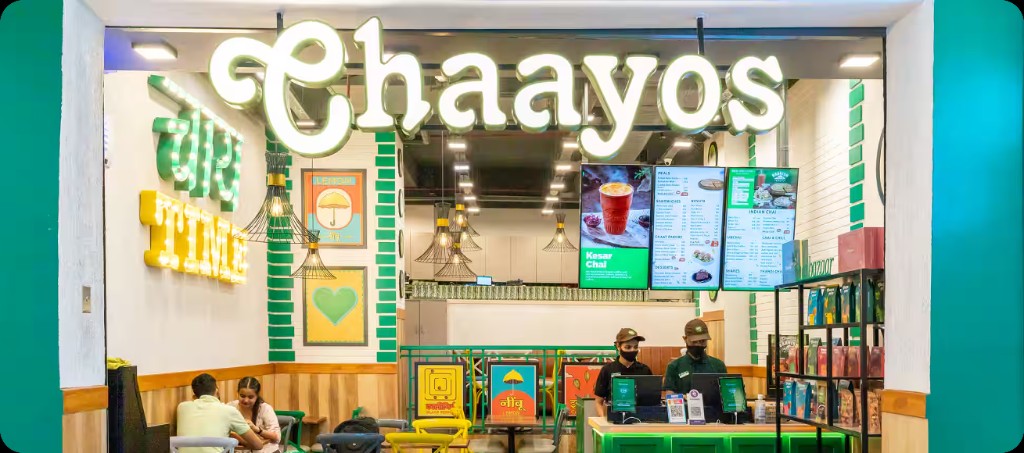
Interior of a Chaayos cafe
Chaayos

The hard part is the handoff.

“It was the handoffs. One approval waiting on another. A vendor update sitting somewhere. A team finding out too late that an upstream task had slipped.”
Mohit MalikCTO, Chaayos
Read the story
Protect your opening date

Every late day
has a cost.

Real estate and construction projects commonly run 30 to 50% over schedule. Every late week means rent paid with no revenue, or standby costs on site.

Calculate your revenue at risk
An illustrative year of openings
Sites per year
8
Monthly rent per site
₹6L
Average delay per site
6 weeks
Rent at risk₹66L / year

Example: 8 × ₹6L × 42 ÷ 30.44 days. Illustrates rent during delay; excludes standby costs.

Stay connected

Keep your tools.
Connect the work.

Bring your workflow together with the tools your teams already use.

NotionGmailWhatsAppRaycastSlackClayClayLinear
Explore integrations
A few things to know

Your questions,
answered.

Is Nodomo commercial real estate project management software or a workflow tool?

Both, for one kind of project: cross-functional work with deadlines, approvals and outside parties. Generic project management tools stop at your company's login page. Nodomo keeps landlords, brokers, clients and subcontractors in the flow from email, with no new platform for anyone to adopt.

Do we still need commercial construction project management software for the build?

Yes, and Nodomo doesn't replace it. Your site scheduling tool and lease system keep doing their job. Nodomo runs the process around both: acquisition, approvals, vendor onboarding, fit-out and handover, the parts that cross teams and companies.

Can we plan backward from a fixed handover date, and see the reason when something slips?

Yes. Set the handover date and Nodomo backward-schedules every task from it, giving you a D-30, D-15 and D-7 view. When a step is rescheduled the owner records a reason, so you know which team caused the delay.

Our landlords, brokers and subcontractors will not log into another tool.

They never have to. They get a link by email or WhatsApp, sign, upload or confirm, and it lands in the flow with a timestamp.

Does it work for developers running multiple sites, not just one fit-out?

Yes. Copy the acquisition or fit-out flow per site and run all of them from one dashboard, each against its own dates and owners.

How fast can we start?

Start from a template or upload the tracker you use today. Most teams have the flow running the same day.

Build your next opening in Nodomo.

Start from the Retail Opening Template or bring the tracker your team already uses. See your first opening as one connected flow.

Get 14 days free trial