Skip to template
FRANCHISE / FRANCHISE PARTNER ONBOARDING / FRANCHISE OPS

Franchise Partner Onboarding / Franchise Ops
Workflow Template

Collect partner documents, verify compliance and approve commercials in one onboarding workflow partners complete through a link.

  • 4 milestones
  • Fully customizable
  • Free to explore
  • Chat & collaborate
A CLOSER LOOK

Franchise Partner Onboarding Project Workflow

Follow the real process, stage by stage, with the approvals and rework loops that keep it honest.

Use This Template
Franchise Partner OnboardingRead-only · Sample teamEstimated duration: 21d
TRIGGER

New Vendor Requested — Procurement form-based trigger (reusable template)

Run this workflow manually with a button click

TASK

New vendor intake — Procurement; vendor name and trade/scope

1dFranchise Development
TASK

COI upload — Vendor link participant; capture expiry; permanent retention

5dFranchise Partner
TASK

Business licence and trade certifications — Vendor link participant; permanent retention

5dFranchise Partner
TASK

Safety record with EMR and incidents — Vendor link participant; permanent retention

5dFranchise Partner
TASK

Bank details and W9/tax form — Vendor link participant; permanent retention

3dFranchise Partner
TASK

Automatic COI renewal reminder — System / Procurement; scheduled before expiry

1dFranchise Partner
TASK

Verify COI coverage, limits and expiry — Compliance; permanent retention

3dFranchise Partner
TASK

Verify business licence and trade certifications — Compliance; permanent retention

3dFranchise Partner
TASK

Verify safety record, EMR and incidents — Compliance; permanent retention

3dFranchise Partner
APPROVAL

Compliance vendor package clearance — Compliance; reason required on rejection; permanent retention

72h1 levelAND joinCompliance
REWORK

Rework

Back to: COI upload — Vendor link participant; capture expiry; permanent retention

TASK

Review quote or rate card against budget — Procurement; permanent retention

3dCompliance
APPROVAL

Commercials and payment terms approval — Finance; permanent retention

72h1 levelFinance
TASK

END — Vendor cleared to start and added to approved vendor list; permanent archive

1dFinance

Drag to explore · Scroll to zoom · Click a step to focus

Task completed Approved Declined Rework15 steps · 17 connections

Every Step in This Workflow

  1. Partner intake
    1. New Vendor Requested — Procurement form-based trigger (reusable template)
    2. New vendor intake — Procurement; vendor name and trade/scope
  2. Document collection
    1. COI upload — Vendor link participant; capture expiry; permanent retention
    2. Business licence and trade certifications — Vendor link participant; permanent retention
    3. Safety record with EMR and incidents — Vendor link participant; permanent retention
    4. Bank details and W9/tax form — Vendor link participant; permanent retention
    5. Automatic COI renewal reminder — System / Procurement; scheduled before expiry
    6. Verify COI coverage, limits and expiry — Compliance; permanent retention
    7. Verify business licence and trade certifications — Compliance; permanent retention
    8. Verify safety record, EMR and incidents — Compliance; permanent retention
  3. Compliance verification
    1. Compliance vendor package clearance — Compliance; reason required on rejection; permanent retention
    2. Rework back to COI upload — Vendor link participant; capture expiry; permanent retention
    3. Review quote or rate card against budget — Procurement; permanent retention
  4. Commercials & activation
    1. Commercials and payment terms approval — Finance; permanent retention
    2. END — Vendor cleared to start and added to approved vendor list; permanent archive
WHAT THIS TEMPLATE INCLUDES

Every Team, Every Milestone,
One Connected Workflow

Explore the milestones and the work included in each stage of your project.

01

Partner Documentation

1 node
Your team
Included in this milestone
  • Partner documentation
02

Brand & Operations Training

1 node
Your team
Included in this milestone
  • Brand & operations training
03

Supplier & Systems Onboarding

1 node
Your team
Included in this milestone
  • Supplier & systems onboarding
04

Readiness Approval

1 node
Your team
Included in this milestone
  • Readiness approval
VIEW YOUR TEMPLATE, YOUR WAY

One Template,
More Ways to See the Work

Plan timelines, follow your workflow, and monitor progress. Explore the existing product visuals below.
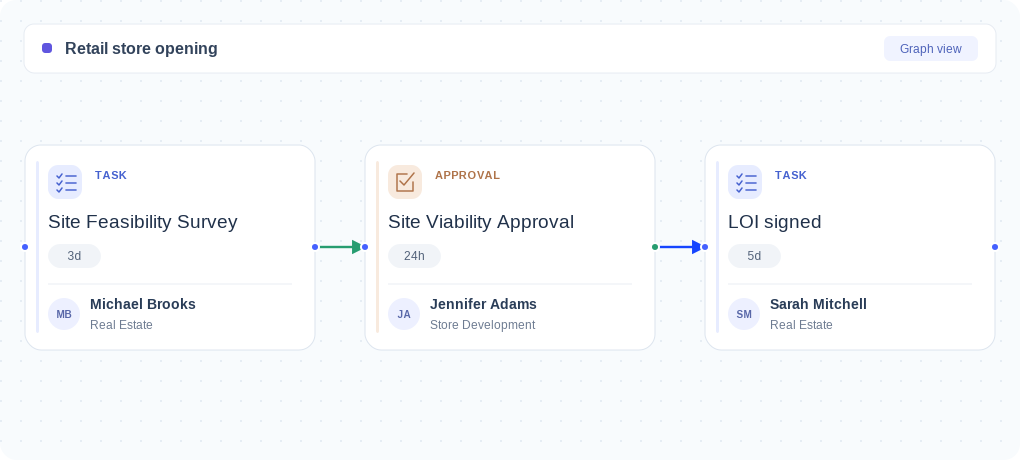
Nodomo workflow with assigned site feasibility, viability approval and LOI tasks
Nodomo product example

Workflow View

Explore this shared Nodomo product example. Configure the view around your own project.
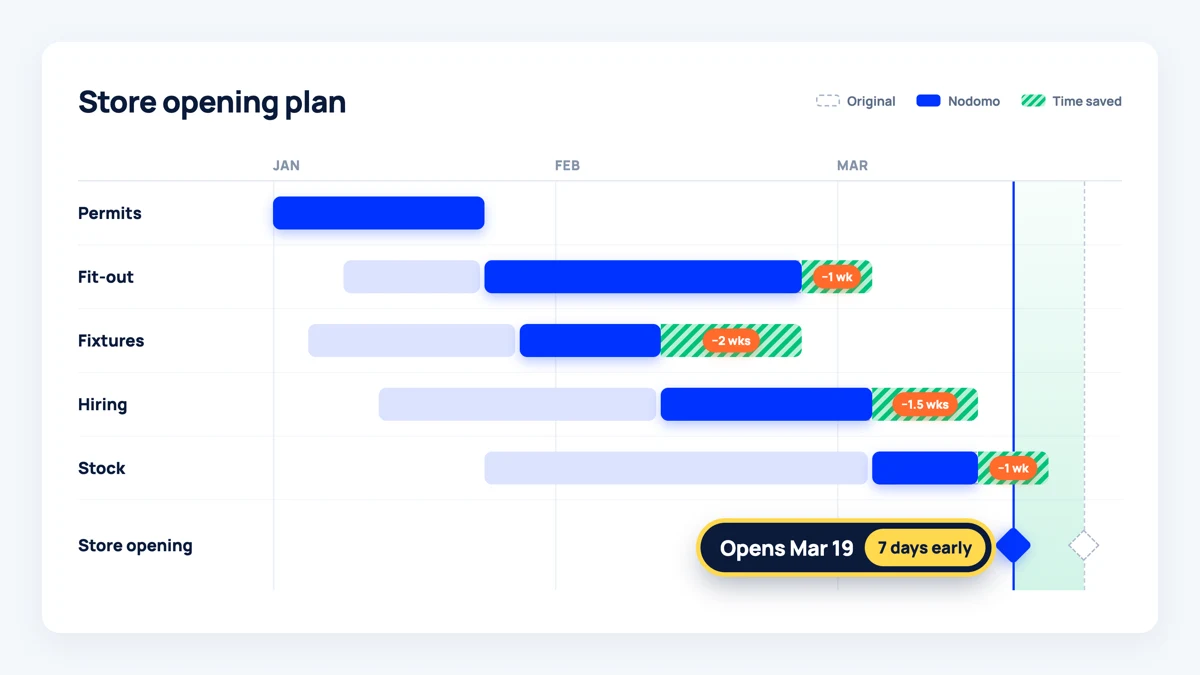
Store opening timeline with parallel work and dependencies
Nodomo product example

Gantt View

Explore this shared Nodomo product example. Configure the view around your own project.
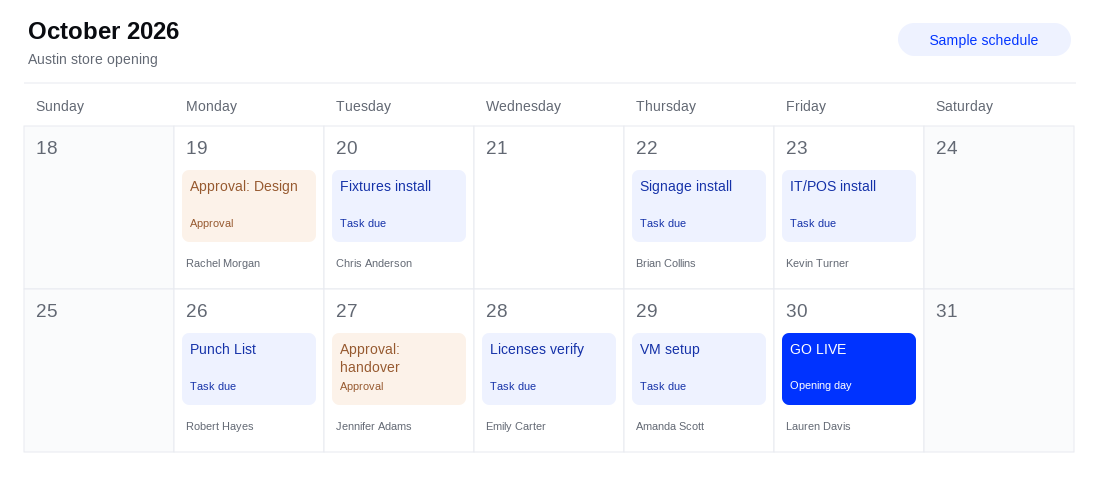
Sample calendar for an Austin store opening with tasks, approvals, assigned owners and opening day
Illustrative calendar concept

Calendar View

Explore this shared Nodomo product example. Configure the view around your own project.
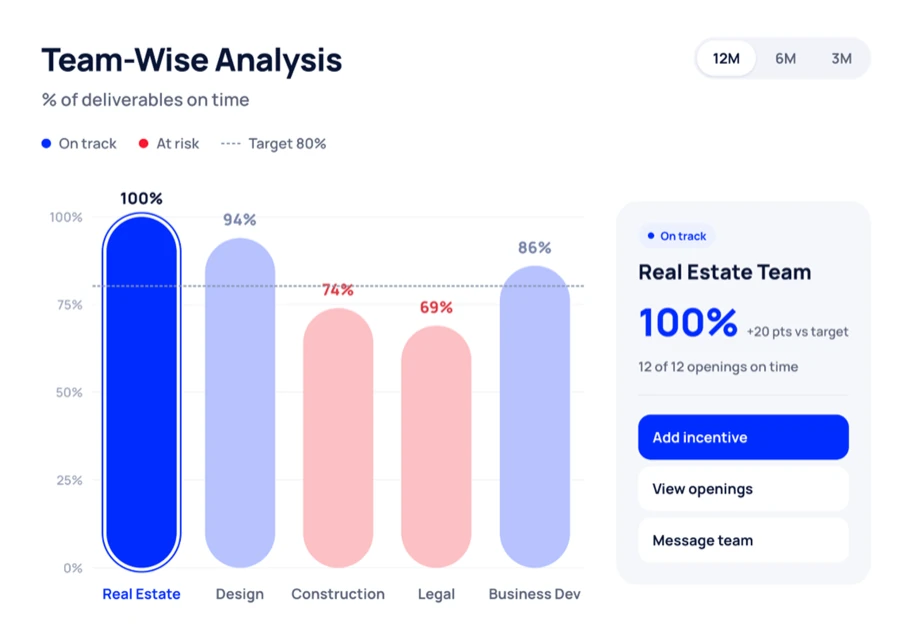
Nodomo team analysis showing on-time deliverables
Nodomo product example

Dashboard View

Explore this shared Nodomo product example. Configure the view around your own project.

A COMPLETE GUIDE TO

What a Franchise Partner Onboarding Checklist Covers

Partner onboarding stalls on documents. Insurance certificates, licences, safety records and tax forms arrive by email in the wrong format, expire quietly, and nobody notices until a site visit.

This template collects each document from the partner through a link, verifies it against a checklist, and holds activation until compliance and commercials have both cleared.
Project updates, documents and messages connected in one flow
One connected process
From the first task to the final milestone

The Stages of Franchise Partner Onboarding

The stages in this template, and what each one protects.
Workflow stageSteps includedWhy Nodomo beats generic tools
01. Partner intakeNew vendor intake — Procurement; vendor name and trade/scope.Partners upload documents through a link, with no account and no software to learn.
02. Document collectionCOI upload — Vendor link participant; capture expiry; permanent retention, Business licence and trade certifications — Vendor link participant; permanent retention, Safety record with EMR and incidents — Vendor link participant; permanent retention, Bank details and W9/tax form — Vendor link participant; permanent retention, Automatic COI renewal reminder — System / Procurement; scheduled before expiry, Verify COI coverage, limits and expiry — Compliance; permanent retention, Verify business licence and trade certifications — Compliance; permanent retention, Verify safety record, EMR and incidents — Compliance; permanent retention.Each document is verified separately, so one missing form does not block the rest.
03. Compliance verificationCompliance vendor package clearance — Compliance; reason required on rejection; permanent retention, Review quote or rate card against budget — Procurement; permanent retention.Expiry dates are captured on upload and chased before they lapse.
04. Commercials & activationCommercials and payment terms approval — Finance; permanent retention, END — Vendor cleared to start and added to approved vendor list; permanent archive.A rejection sends back only the document that failed, with the reason attached.

Activate Partners Without Chasing Paperwork

The onboarding record is the compliance record. When every certificate is attached to the step that verified it, an audit is a search rather than an archaeology project.

Reuse the same workflow for every partner and see who is stuck at which document.

KEEP EXPLORING
Browse all templates
A FEW MORE DETAILS

Frequently Asked
Questions

Can I customize this franchise partner onboarding / franchise ops template?

Yes. Use the starter stages as a starting point, then review the tasks, assign owners, and configure dates and approvals for your process.

Can I reuse this workflow for other projects?

Reuse your configured workflow for each project and track progress from the portfolio dashboard.

Can external vendors participate without creating a Nodomo account?

Yes. Participants can respond to assigned tasks and approvals through task links without signing up or logging in.

Can I import my existing Excel tracker?

Nodomo’s AI-assisted builder can use a spreadsheet to create a draft workflow. Review and refine the tasks and dependencies before starting your project.

Stop finding out about delays in the weekly review

Know which projects are on track, where work is stuck, and who needs to move next. Bring every project update into one connected view.

Start your 15-day free trial